Support at Home gives providers more to track than ever. Every client has quarterly funding, an agreed budget, care management limits, and sometimes a Home Care Packages balance to think about. Then there's government reporting on top, including the Aged Care Financial Report (ACFR).
Providers told us what they need from a Support at Home dashboard: one that shows where things stand, tells the difference between a real risk and a normal overage, and makes the numbers easy to trust and take elsewhere.
That's what the TurnPoint Support at Home Dashboard and Budget Tracker are built to do, and we shaped them with providers. Here's a closer look at what the dashboard gives you.
Warnings that mean something
Not every overage is a problem. Going over an agreed budget is common, and the funding is usually still there. Going over the funding itself is different, because that's where you may not get paid.
The dashboard breaks it down. A banner at the top of the Budgets tab lists what is over a limit this quarter, with a separate line for each. Each line shows the dollar amount and how many budgets are affected, with a prompt to update the budget where that's the fix.
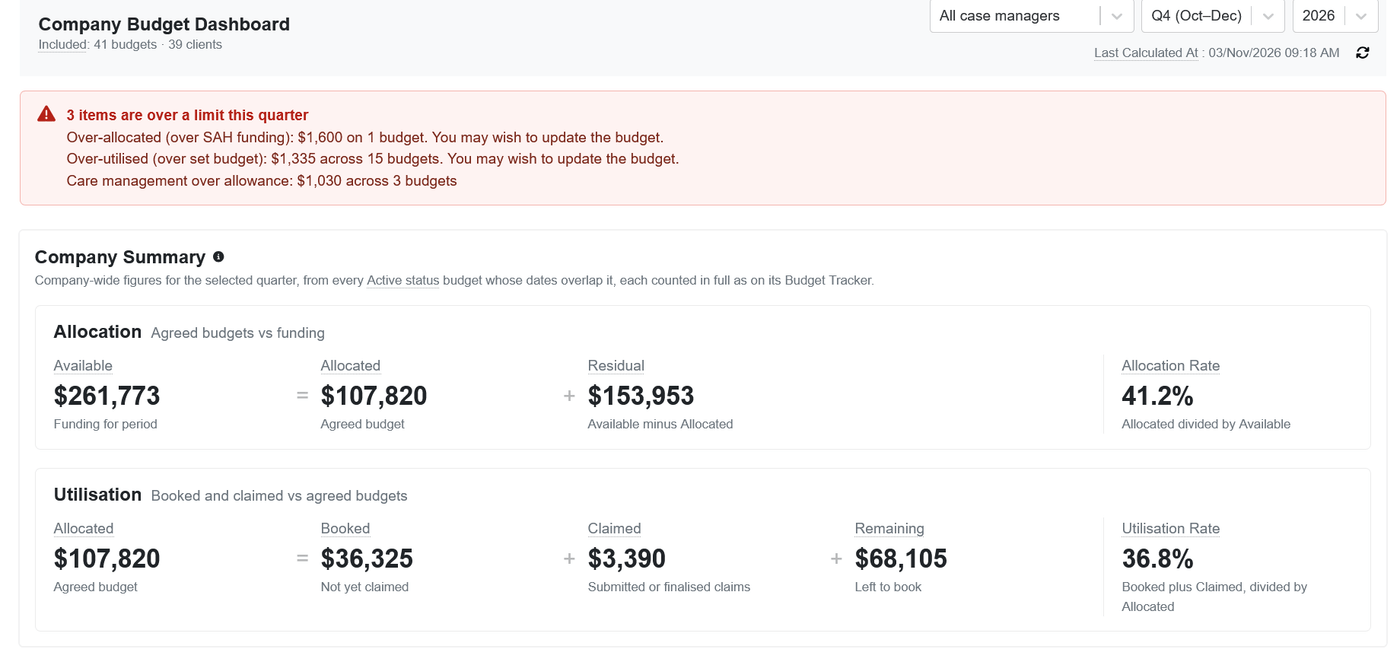
- Over-allocated — agreed budgets add up to more than your Support at Home funding
- Over-utilised — booked and claimed work is over the set budget, which usually means the budget needs updating
- Care management over allowance — care management has used more than its allowance
Figures that line up, and care management you can act on
The dashboard and the Budget Tracker use the same rules and show the same figures. The Company Summary splits Allocation (agreed budgets against the funding available) from Utilisation (booked and claimed against agreed budgets), each with its own rate, so you can see how much funding is committed and how much of it is being used.
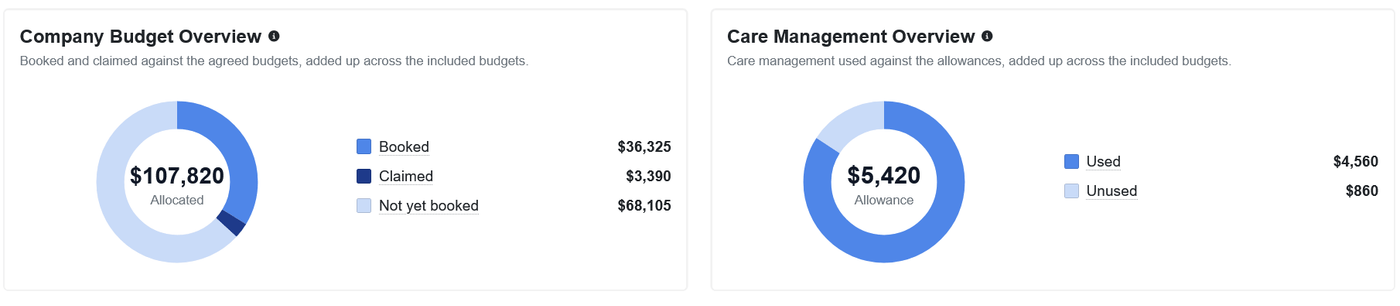
Providers must make care management contact with each client every month. The dashboard shows a count of care management appointments per client, so anyone with none stands out. Care management by worker shows hours, and the average hours per working day, instead of dollars, which is how teams manage it.
Find what matters faster, and take it into Excel
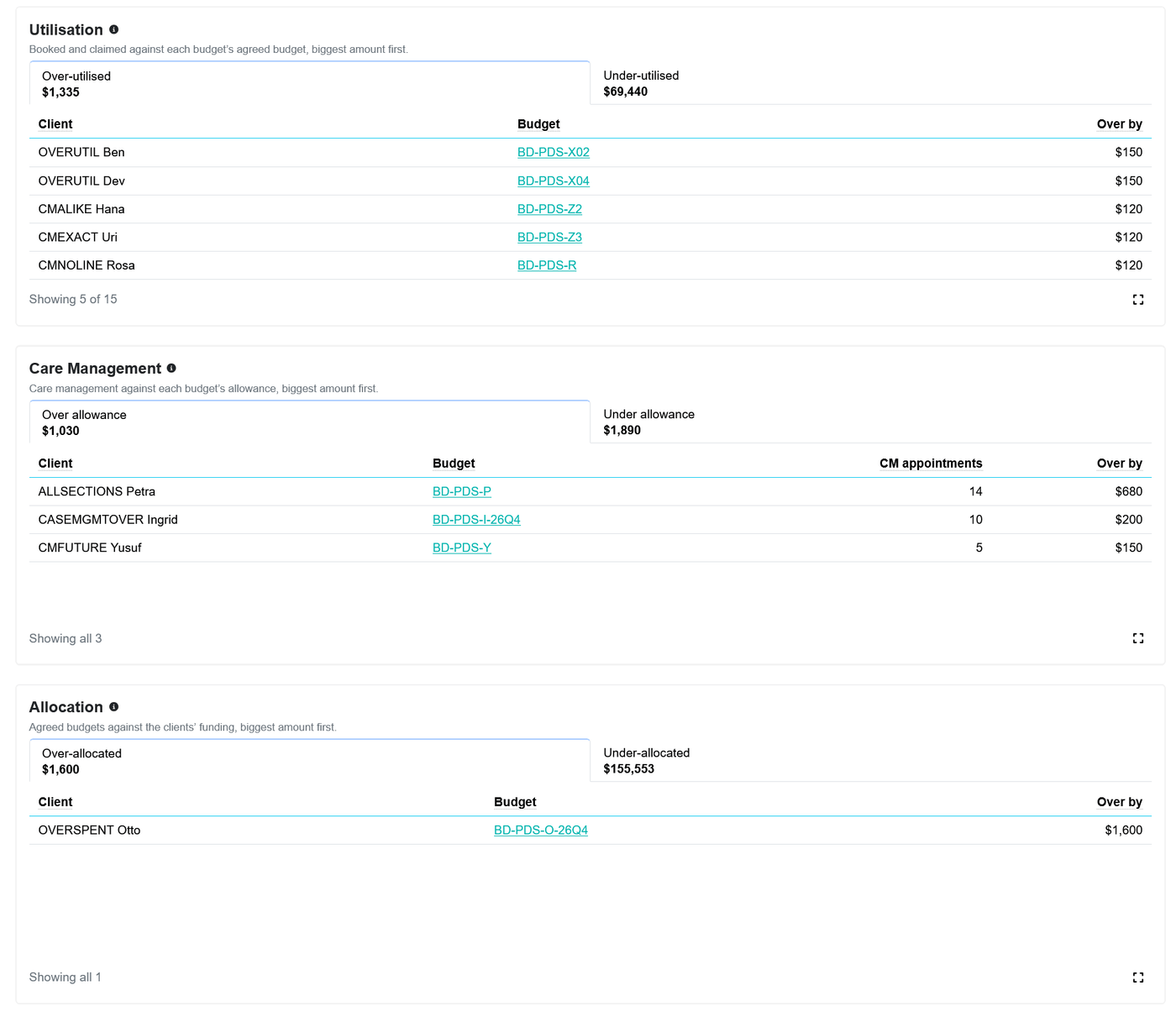
Filter the dashboard by case manager, quarter and year, so team leaders can focus on their own people and clients. Every list puts the biggest amounts first, and each one has tabs for both sides of the story: over-utilised or under-utilised, over or under the care management allowance, and over-allocated or under-allocated. Unused funding is as worth seeing as overspending.
Each budget in a list is a link you can click through to. When a table shows only the top few, the expand icon opens the full list. Care management by worker flips between most hours first and least hours first.
Every "Show all" table on the dashboard exports to Excel. Add your own targets, work out utilisation your way, and share it with your team. The Statements tab exports too.
Fast, steady loading, checked against worked examples
Widgets load one at a time, each with its own loading state, so one slow figure never holds up the page. Recently worked-out figures are reused instead of being recalculated every time you open the dashboard, and a "last calculated" time with a refresh button shows how current they are.
Each section of the dashboard and Budget Tracker is checked against example data with known correct answers, and documented in our knowledge base so your team can see how each figure is worked out.
Making ACFR reporting easier to prepare
Registered providers delivering Support at Home must complete an Aged Care Financial Report each year, including a new Support at Home Income and Expenditure Statement. Providers that deliver only CHSP don't have to submit one.
The hard part is rarely the form. It's knowing the figures are right and being able to show where they came from. The dashboard's ACFR tools are built for that.
The dashboard helps you prepare and check your figures. Your organisation remains responsible for the final report you submit to government.
- Trace every figure — the ACFR Items tab shows the budget entries behind each figure in the ACFR report, so you can check a number rather than take it on trust
- See the category for each claim — the Claim Items report shows what was paid for a service and which ACFR category it falls into
- Export at scale — the ACFR Items export handles large providers without timing out
- Careful category mapping — items are categorised to ACFR categories with care, including those paid from Home Care Packages unspent funds
What it means across your organisation
Less time reconciling screens, more time on the clients who need attention. That's less administration, more confidence and better care. If admin load is the wider issue, our post Stop drowning in admin covers what the best providers are doing differently. And if you're checking how the October personal care change flows through budgets, see Personal Care Is Now Free Under Support at Home.
- Finance — clearer view of utilisation against funding, figures you can trace into ACFR preparation, and exports for your own analysis
- Operations — warnings that separate real funding risk from normal budget variation, so effort goes where it matters
- Care managers — a count of care management contacts per client, so clients with no contact are easier to spot
- Team leaders — care management hours per worker, ready to compare against your own targets in Excel
See it for yourself
Existing TurnPoint customers can find the dashboard in your Support at Home area, and our knowledge base explains each section.
Not on TurnPoint yet? Come and see it at the Ageing Australia National Conference, 24 to 26 November 2026 at the Sydney International Convention Centre. Find us at Booth 293. Bring a real Support at Home reporting problem and we'll show you how the dashboard handles it, or design a concept with you if it doesn't. Read more in What's Eating Your Team's Week? Bring Us Your Problem at Ageing Australia 2026.
TurnPoint is built for providers dealing with constant reform, workforce pressure and complex funding, with every funding stream in one platform and a 100% Australian support team.
Ready to cut the admin and get back to care?
TurnPoint is purpose-built for Australian home care and Support at Home providers. See how our platform handles SAH claiming, monthly statements, rostering, and compliance — all in one place.
Book a demo →